I recently noticed a strange macOS Spotlight bug. Searching for Battery returned all the correct System Settings results, but instead of showing Battery as the section title, Spotlight displayed:
BATTERY_PREF_TITLEThere was also a generic white icon where I would have expected the Battery icon.
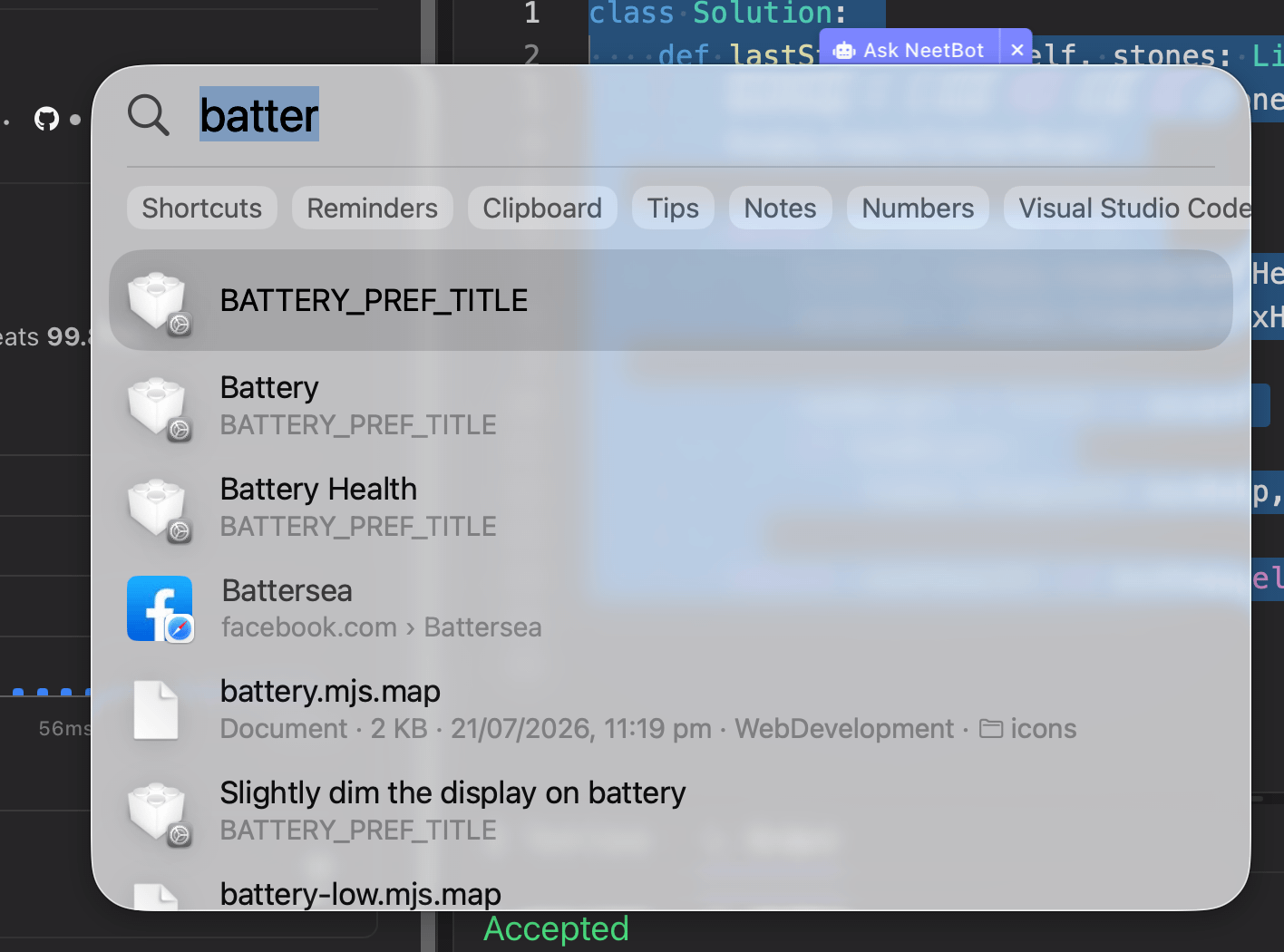
The results themselves worked. For example, clicking Battery Health correctly opened the Battery section of System.
BATTERY_PREF_TITLE looked suspiciously like an internal localization key that macOS was accidentally exposing to the user.
After digging into macOS's System Settings resources, I eventually found the cause — or at least a completely reproducible trigger:
English (UK) as the primary macOS language causes Spotlight to displayBATTERY_PREF_TITLE. Switching the primary language to English (US) makes it correctly displayBattery.
Here's how I traced it down.
First: Is this just a broken Spotlight index?
My first thought was that Spotlight's index might be corrupted.
I checked its status:
mdutil -saSpotlight indexing was enabled:
/:
    Indexing enabled.
/System/Volumes/Data:
    Indexing enabled.
/System/Volumes/Preboot:
    Indexing enabled.
Searching Spotlight's metadata for the literal string wasn't particularly useful either:
mdfind "BATTERY_PREF_TITLE"So rather than immediately deleting or rebuilding indexes, I decided to find out where BATTERY_PREF_TITLE was actually coming from.
Finding BATTERY_PREF_TITLE inside macOS
I searched Apple's System Settings-related files for the literal string:
grep -RIl "BATTERY_PREF_TITLE" \
  /System/Library/PreferencePanes \
  /System/Library/PrivateFrameworks \
  /System/Library/ExtensionKit/Extensions \
  2>/dev/null | head -50
This produced one particularly interesting result:
/System/Library/ExtensionKit/Extensions/PowerPreferences.appex/Contents/Info.plistPowerPreferences.appex is Apple's extension responsible for the relevant Battery/Power settings.
I inspected the surrounding metadata:
plutil -p /System/Library/ExtensionKit/Extensions/PowerPreferences.appex/Contents/Info.plist \
  | grep -C 5 "BATTERY_PREF_TITLE"
And there it was:
"predicate" => "powersource.battery == YES"
"sidebar-iconUTTypeIdentifier" => "com.apple.graphic-icon.battery"
"sidebar-name" => "BATTERY_PREF_TITLE"
"sidebar-uuid" => "BatteryPreferences"
So Spotlight wasn't getting BATTERY_PREF_TITLE from some random corrupted file.
It's an actual internal string defined by Apple.
The important part is:
"sidebar-name" => "BATTERY_PREF_TITLE"Normally, macOS should take that localization key and turn it into the human-readable:
BatteryFor some reason, that final step wasn't happening.
Checking whether the Battery translation actually exists
The next question was obvious: maybe the localization resources were missing.
I looked inside:
/System/Library/ExtensionKit/Extensions/PowerPreferences.appex/Contents/Resources/The extension contains several compiled localization tables:
BatteryUI.loctable
BatteryUI-J316.loctable
InfoPlist.loctable
Localizable.loctable
It also has language-specific resources for:
en.lproj
en_AU.lproj
en_GB.lproj
among many other languages.
So I searched the localization tables:
strings /System/Library/ExtensionKit/Extensions/PowerPreferences.appex/Contents/Resources/Localizable.loctable \
  | grep -i -E 'BATTERY_PREF_TITLE|Battery'
BATTERY_PREF_TITLE and the actual Battery translation were present.
The same was true for BatteryUI.loctable.
That meant the translation wasn't simply missing from macOS.
Asking macOS to translate the key directly
This was the most useful test.
Instead of trying to reverse-engineer Apple's .loctable files, I used Foundation's Bundle API and asked macOS itself to resolve the string.
swift -e '
import Foundation

let bundle = Bundle(path: "/System/Library/ExtensionKit/Extensions/PowerPreferences.appex")!

for table in [nil, "Localizable", "BatteryUI", "InfoPlist"] {
    let result = bundle.localizedString(
        forKey: "BATTERY_PREF_TITLE",
        value: nil,
        table: table
    )
    print("\(table ?? "default"): \(result)")
}
'
The result was extremely interesting:
default: Battery
Localizable: Battery
BatteryUI: Battery
InfoPlist: BATTERY_PREF_TITLE
So macOS does know how to translate the key:
BATTERY_PREF_TITLE → Batterywhen using the normal localization tables.
But looking it up through InfoPlist gives the untranslated key back:
BATTERY_PREF_TITLEThat lined up remarkably well with what Spotlight was displaying.
It suggested that this wasn't really a missing translation. Something in the System Settings/Spotlight search pipeline appeared to be resolving Apple's sidebar-name using a localization path where the translation wasn't available.
But that still didn't explain why it was happening.
The clue: English (UK)
I checked my current macOS language configuration:
defaults read -g AppleLanguages
defaults read -g AppleLocale
It showed:
(
    "en-GB"
)

en_GB
My Mac was therefore using English (UK).
There was an easy way to test whether this mattered.
I went to: System Settings → General → Language & Region and added English (US).
I made English (US) the primary language, while keeping my Region set to United Kingdom.
After logging back in, I searched for battery in Spotlight again.
This time:
BatteryThe problem was gone.
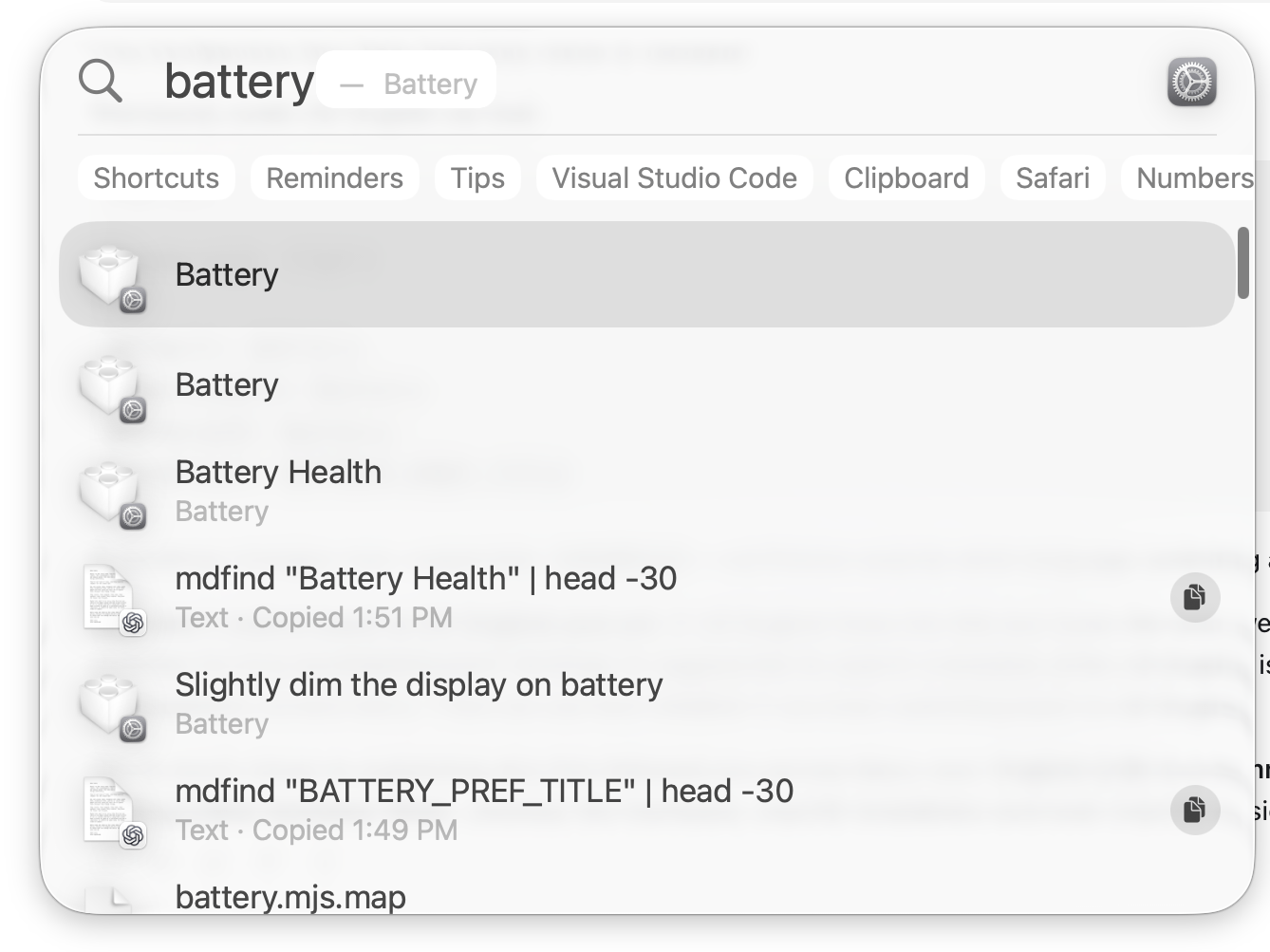
That was promising, but it wasn't proof. Changing languages might simply have caused Spotlight to refresh some cached metadata.
So I switched back.
Reproducing the bug
I kept both languages installed but made English (UK) primary again.
My configuration was now:
(
    "en-GB",
    "en-US"
)

en_GB
I searched for Battery.
Immediately:
BATTERY_PREF_TITLEcame back.
Then I made English (US) primary again.
Spotlight went back to:
BatterySo I could reproduce the behaviour:
| Primary macOS language | Spotlight |
|---|---|
| English (UK) | ❌ BATTERY_PREF_TITLE |
| English (US) | ✅ Battery |
| English (UK) again | ❌ BATTERY_PREF_TITLE |
| English (US) again | ✅ Battery |
At that point, it was clear that English (UK) was the trigger on my system.
The workaround
The workaround is fortunately very simple.
Open: System Settings → General → Language & Region
Add English (US) and make it your primary language.
You don't have to change your region to the United States.
For example, I'm using:
Language: English (US)
Region:   United Kingdom
Your keyboard layout is also independent of this setting, so if you have a UK keyboard you can continue using: System Settings → Keyboard → Text Input → British
In other words, you can have:
Display language: English (US)
Region:           United Kingdom
Keyboard:         British
and Spotlight should display:
Batteryinstead of:
BATTERY_PREF_TITLEWhat about the missing Battery icon?
There's one related-looking issue I haven't completely resolved.
My Spotlight Battery results show a generic white icon rather than the Battery icon.
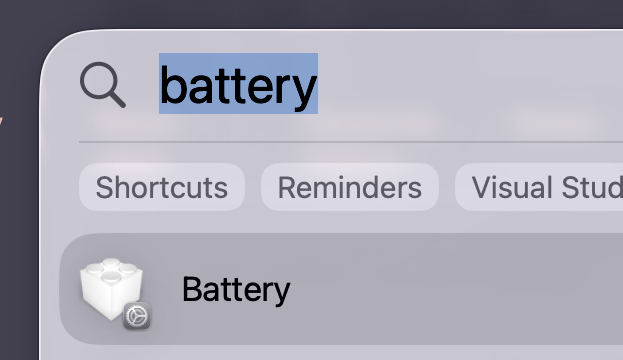
Interestingly, System Settings itself displays the Battery icon correctly.
Apple's PowerPreferences metadata specifies:
"sidebar-iconUTTypeIdentifier" => "com.apple.graphic-icon.battery"So the correct icon is being requested, and System Settings can display it. Spotlight appears to be falling back to a generic representation instead.
Importantly, switching between English (UK) and English (US) does not fix the icon, so this appears to be a separate issue from BATTERY_PREF_TITLE.
I'm testing whether rebuilding Spotlight's index helps:
sudo mdutil -E /I'll update this post if I find a definitive fix for the icon as well.
Why I wouldn't start deleting Spotlight or system files
If you encounter this problem, I'd recommend trying the language test before doing anything destructive.
You may find suggestions to delete Spotlight databases, reset Launch Services, modify /System resources, disable SIP, or delete various caches.
In this case, none of that should be the first step.
The underlying Battery extension works. The localization exists. macOS itself can successfully resolve:
BATTERY_PREF_TITLE → BatteryAnd most importantly, I can make the problem appear and disappear simply by changing the primary language.
That points to a macOS localization/search integration issue rather than damaged system files.
Quick fix
If you found this article because Spotlight is literally displaying:
BATTERY_PREF_TITLEtry this first: System Settings → General → Language & Region → Preferred Languages
Add English (US) and make it your primary language.
You can leave Region set to United Kingdom.
Log out and back in if macOS asks you to, then search for battery in Spotlight again.
For me:
English (UK) → BATTERY_PREF_TITLE
English (US) → Battery
And switching back to English (UK) immediately brought the bug back.
So if you're seeing BATTERY_PREF_TITLE in Spotlight, your Mac probably isn't corrupted. Check whether English (UK) is your primary macOS language first.